Logitech G PRO X2 SUPERSTRIKE Review (2026): 61g Weight, Pros, Cons & Verdict
Affiliate disclosure: This post contains Amazon affiliate links. If you buy through them, we may earn a small commission at no extra cost to you. It never changes our opinion.
This Logitech G PRO X2 SUPERSTRIKE Review starts with a slightly strange question: can a mouse click actually be better than a mouse click?
For years, the PRO line has been the “don’t mess with it” option for competitive players. Same familiar shape, same light body, same simple buttons.
The SUPERSTRIKE keeps almost all of that and changes only the part your finger touches the most. That’s either brilliant or unnecessary, and the next few minutes will help you decide which.
Quick Answer:
The Logitech G PRO X2 SUPERSTRIKE is worth buying if you play competitive shooters and want faster, fully adjustable clicks in the familiar PRO shape.
It weighs 61g, uses LIGHTSPEED wireless with up to 8,000 Hz polling, and lasts roughly 60 to 90 hours per charge. At around $179, it’s a premium purchase, so casual players can save money with an older PRO model.
Logitech G PRO X2 SUPERSTRIKE Pros and Cons
Here’s the whole Logitech G PRO X2 SUPERSTRIKE Review boiled down to what’s good, what’s not, and what depends on you.
👍 Pros
- Fully adjustable clicks. You can set both the actuation and reset points on the main buttons.
- Very light at 61g. TechRadar says it doesn’t feel flimsy despite the low weight.
- Very quiet main buttons. TechRadar described them as extremely quiet.
- No mechanical switch to wear out. Retailers describe the HITS design as removing the usual double-click problem.
- Fast wireless. The HERO 2 sensor reaches 44,000 DPI, and LIGHTSPEED supports up to 8,000 Hz polling.
- Long battery life. Logitech advertises 60 to 90 hours per charge.
- Familiar PRO shape. The design traces back to the PRO Wireless and Superlight line, so you won’t have much to relearn.
- Works with PC and Mac, and it’s compatible with POWERPLAY 2 charging.
👎 Cons
- It’s expensive. The list price is $179.99, and the POWERPLAY 2 sells separately.
- Only five programmable buttons. That’s a limit if you want lots of side-button shortcuts.
- Side buttons are still loud. One owner said everything is silent except the side buttons.
- Balance isn’t perfect for everyone. One buyer felt the front end was a little heavy.
- The speed gain varies. Logitech claims 9 to 30 ms lower click latency, but one reviewer’s own timing test found almost no average difference against a G502 X.
- The design isn’t for everyone. TechRadar expects the ultra-modern look to put some buyers off.
- Long-term durability is unproven. The mouse is new, and a few owners have posted about click problems on repair forums.
- You need G HUB. The best HITS features depend on Logitech’s software.
What Is HITS, and Why Should You Care?
If you only remember one thing from this Logitech G PRO X2 SUPERSTRIKE Review, make it this: HITS is the reason the mouse exists.
A normal mouse button is a small mechanical switch. You press it, something clicks, and the mouse registers it. HITS works differently. It measures how far the button has moved, and a tiny haptic motor creates the feeling of a click for your finger.
You Choose When a Click Counts
Because the mouse tracks movement instead of waiting for a switch to snap, you can decide where a click registers and where it resets.
Logitech describes this as adjustable actuation and reset points on the main buttons. Want a hair-trigger? Done. Prefer a deeper, more deliberate press? That works too.
A Click That’s Generated, Not Mechanical
It sounds odd at first, but that’s the whole trick. One European reviewer thought the price was steep, yet praised how precisely you can tune the click feel, pressure, and release point.
How Quiet Are the Clicks?
If you’re coming from a loud, clicky mouse, this is a big change. With no mechanical switch inside, the main buttons are very quiet.
TechRadar described them as extremely quiet, and one retailer review notes five click-feedback levels, from crisp to silent.
Another reviewer said the click is closer to a dull bump than a traditional click sound. The side buttons are the exception.
One owner said everything is silent except the side buttons, which are still loud.
Is It Really Faster?
Logitech’s claim is bold. The company says the system can cut click latency by roughly 9 to 30 milliseconds. Think of it as the ceiling, not what you’ll see every day.
One reviewer’s own timing test found almost no average difference against a G502 X, so your result depends on your settings and how you play.
The sensible takeaway is that clicks are meant to feel lighter and quicker, and early owners seem to enjoy them.
One owner mentioned needing about an hour to get used to how it feels. So give it a few sessions before you judge.
Weight, Shape & Grip
Weight matters in every Logitech G PRO X2 SUPERSTRIKE Review, because nobody buys this mouse to feel slow.
A 61g Body
The shell is thin-walled, around 0.7 mm, which is how Logitech fits the new click hardware while keeping the mouse at 61g. That’s light enough for fast flicks without feeling cheap.
A Shape You May Already Know
The symmetrical design began with the PRO Wireless and was refined across the Superlight line. If you’ve used one of those mice, you’ll feel at home. One reviewer says it suits all grip types.
Not everyone agrees on balance, though. One buyer felt the front end was a little heavy and called the weight distribution poor.
That’s one person’s opinion, but it’s a good reason to check the return policy if you’re fussy about it.
The Look
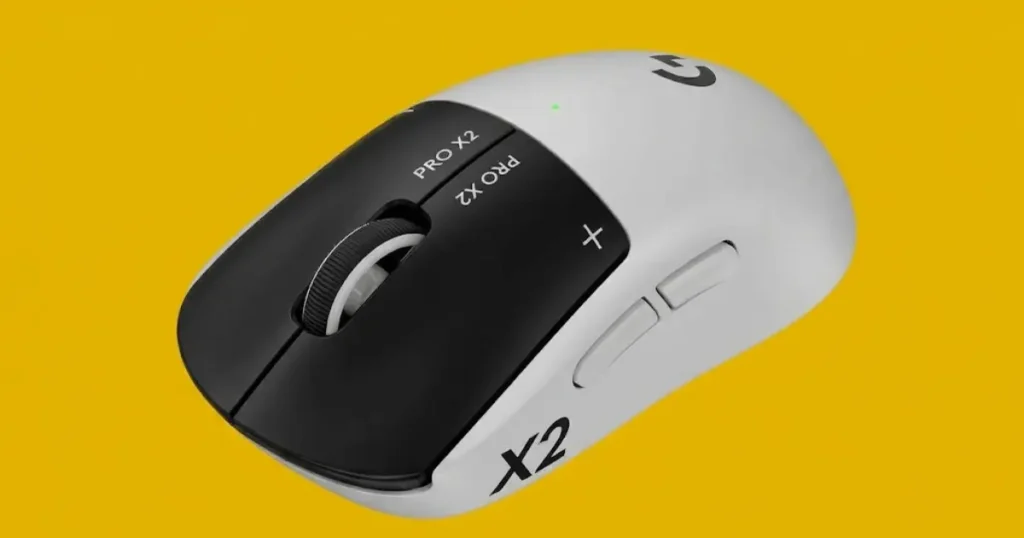
The mouse has a white body, black buttons, and big X2 and SUPERSTRIKE branding on the sides. It’s louder in style than earlier PRO models.
The Amazon listing we looked at showed a Black/White version, so double-check the color before you order.
Sensor, Polling Rate & Wireless Performance
This section of the Logitech G PRO X2 SUPERSTRIKE Review is short because the numbers speak for themselves.
- Sensor: The HERO 2 sensor goes up to 44,000 DPI, tracks above 888 IPS, and handles acceleration over 88 G. You won’t use numbers that high, but it means the sensor won’t hold you back.
- Polling rate: LIGHTSPEED wireless supports up to 8,000 Hz. That means smoother cursor updates, though it uses more battery.
- Wired mode: It also works with a cable, at up to 1,000 Hz.
The mouse works with both PC and Mac, and you’ll need Logitech G HUB for the advanced features. Plan on installing it, since that’s where you’ll tune HITS.
Battery Life & POWERPLAY 2
Battery life comes with an asterisk. Logitech advertises 60 to 90 hours, with up to 90 hours in constant motion. That’s a wide range, because your settings change everything.
One buyer noted that the mouse uses a lot of power when every feature is turned up to the maximum. That makes sense, since high polling and strong haptics both cost energy.
Another reviewer reported 80 to 90 hours at 1,000 Hz, which is solid for a mouse this light.
You have two ways to charge it:
- USB-C: Plug it in and go.
- POWERPLAY 2: Logitech’s wireless charging mat keeps the mouse topped up while you play. It’s sold separately, so add that cost if you want it.
Logitech G PRO X2 SUPERSTRIKE vs PRO X SUPERLIGHT 2
Most people reading this Logitech G PRO X2 SUPERSTRIKE Review are really comparing it with the PRO X SUPERLIGHT 2.
The two share the same shape family, so the grip and glide should feel familiar. The real difference is the click.
The SUPERSTRIKE gives you adjustable, haptic clicks, while the older mouse uses a traditional switch design.
If clicks matter most to you, that’s the reason to pay extra. If you mostly care about shape and weight, the older mouse may be all you need.
Prices and details change, so open both Amazon listings side by side before you decide.
Who Should Buy It, and Who Shouldn’t
The short answer from this Logitech G PRO X2 SUPERSTRIKE Review: buy it for the clicks, not for the shape.
Buy it if:
- You play fast shooters and want to tune your clicks.
- You already like the PRO shape.
- You want strong battery life without extra weight.
- You like a quiet mouse.
Skip it if:
- Your current mouse already feels great.
- You want extra side buttons, since it has only five programmable buttons.
- The price is the biggest concern.
(FAQ)
Is the Logitech G PRO X2 SUPERSTRIKE good?
Yes, especially for competitive shooters. It combines a 61g body, adjustable HITS clicks, 8,000 Hz wireless polling, and long battery life.
The Amazon US listing showed 4.6 stars from 726 ratings in mid-October 2026. One reviewer called the price steep but praised how finely the clicks can be tuned.
It has only five programmable buttons, so it’s not for people who want many side buttons.
How much does the Logitech G PRO X2 SUPERSTRIKE cost?
The US list price is $179.99, which matches the Amazon listing we checked. POWERPLAY 2 charging is sold separately.
Deal sites have also tracked temporary Amazon discounts, so always check the live listing before you buy.
What is PRO X2 SUPERSTRIKE?
It’s a wireless esports gaming mouse from Logitech G.
It weighs 61g, uses the HERO 2 sensor, and replaces ordinary mechanical click switches with HITS, a system with adjustable actuation and reset points.
Logitech developed it with more than 100 esports pros.
Does the Logitech G PRO X2 SUPERSTRIKE double click?
It’s designed not to. Double-clicking usually comes from worn mechanical switches.
HITS replaces that switch with electromagnetic sensing, and retailers describe this as removing the double-click problem. The mouse is still new, so long-term data is limited.
A few owners have posted about sticky or physical click problems on repair forums.
If a click ever feels off, check your actuation and reset settings in G HUB first, then contact Logitech support.
Is the X2 Superstrike silent?
Almost, but not completely. The main buttons are very quiet because there’s no mechanical click.
TechRadar described them as extremely quiet, and one retailer review notes five click-feedback levels, from crisp to silent.
The side buttons are different. One owner said everything is silent except the side buttons, which are still loud.
Why are Logitech mice so expensive?
Much of the price comes from the hardware and development behind them: precise sensors, wireless technology, light but sturdy shells, and software like G HUB.
The SUPERSTRIKE adds new click hardware on top, and it lists at $179.99. Logitech says it designed it with more than 100 esports pros.
Logitech also sells cheaper mice, so you don’t need a flagship to get a good one.
Which Logitech mouse is best?
It depends on how you use it. For competitive shooters, the PRO X2 SUPERSTRIKE is the standout in this guide.
For lots of programmable buttons, the G502 X Plus fits better ([Logitech G502 X Plus Review]).
For office and creative work, the MX Master line is the usual choice ([Logitech MX Master 3S Review] and [Logitech MX Master 4 Review]).
What is so good about Logitech SuperStrike?
Mostly the clicks. HITS lets you choose where a click registers and resets, and one retailer’s review lists 10 trigger-pressure levels and 5 click-feedback levels.
Logitech claims it cuts click latency by roughly 9 to 30 milliseconds. One reviewer’s own timing test found almost no average difference against a G502 X, so the speed benefit depends on how you play.
How heavy is the G PRO X2 SUPERSTRIKE?
It weighs 61 grams. TechRadar says it doesn’t feel flimsy despite being so light. That’s light enough for fast flicks.
What is HITS on the Logitech G PRO X2 SUPERSTRIKE?
HITS stands for Haptic Inductive Trigger System. It lets you adjust where the main buttons register and reset, and it gives haptic click feedback.
How long does the battery last?
Logitech advertises roughly 60 to 90 hours, depending on use. High polling rates and strong haptic settings drain it faster.
Does it work wirelessly and wired?
Yes. It uses LIGHTSPEED wireless and also works over USB-C.
What polling rate does it support?
Up to 8,000 Hz wirelessly and up to 1,000 Hz wired.
Does it work with Mac?
Yes, it works with PC and Mac. You need Logitech G HUB for advanced features.
Does it support POWERPLAY 2 charging?
Yes, it’s compatible with POWERPLAY 2, which is sold separately.
Is it good for all grip types?
It uses a symmetrical shape that suits many hands. Comfort is personal, so check the return policy if you’re unsure.
Is this Logitech G PRO X2 SUPERSTRIKE Review based on real specs?
Yes. This Logitech G PRO X2 SUPERSTRIKE Review is built on the specs Logitech publishes, what retailers list, and what reviewers and owners report.
We haven’t run our own lab tests, so check the Amazon page for the newest details.
Final Verdict: Should You Buy the Logitech G PRO X2 SUPERSTRIKE on Amazon?
After this Logitech G PRO X2 SUPERSTRIKE Review, my answer is simple: it’s the most interesting PRO mouse in years, but only if you’ll actually use what makes it different.
The adjustable clicks, the 61g body, and the solid battery make it a strong pick for serious competitive players.
If you’re a casual player, an older PRO mouse will serve you well for less.
If you’re ready to buy, the Logitech G PRO X2 SUPERSTRIKE Amazon listing is the easiest place to check the current price, color options, and stock.
Found this Logitech G PRO X2 SUPERSTRIKE review helpful? Check the latest price below.
Related reads: Logitech G502 X Plus Review| Logitech MX Master 3S Review| Logitech MX Master 4 Review