Logitech G502 X Plus Review (2026): Is It Worth the Upgrade?
Affiliate disclosure: This post contains Amazon affiliate links. If you buy through them, we may earn a small commission at no extra cost to you. It never changes our opinion.
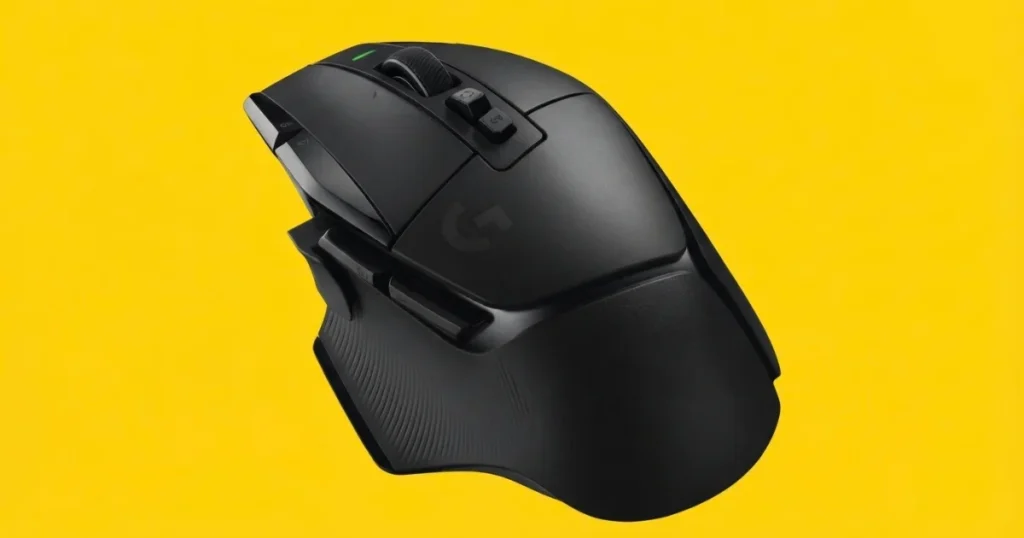
Quick Answer: The Logitech G502 X Plus is worth buying if you want a wireless G502 with faster LIGHTFORCE optical-mechanical switches and a lighter 106g body.
It uses LIGHTSPEED wireless only (no Bluetooth) and is priced as a premium mouse. Upgrade from the G502 LIGHTSPEED if your switches are wearing out; otherwise, you can wait.
Quick Facts at a Glance
- Weight: About 106 grams.
- Bluetooth: No. It uses the LIGHTSPEED 2.4GHz USB receiver, plus a wired USB-C option.
- Battery life: Well over 100 hours with RGB off, and much less with default lighting on.
- vs G502 LIGHTSPEED: Optical-mechanical switches, a lighter body, better battery efficiency, and more programmable controls.
- Work and productivity: Yes. The dual-mode scroll wheel and 13 programmable controls help with editing, coding, and spreadsheets.
- Mac support: Yes, via Logitech G HUB (check the current requirements for your macOS version)
- Wired while charging: Yes, over the USB-C cable.
- POWERPLAY wireless charging: Yes, sold separately.
- Button remapping: Most controls in G HUB, though core functions like the primary left click stay available by default.
This Logitech G502 X Plus Review answers one question: does the Logitech G502 X Plus Wireless Gaming Mouse change enough to justify replacing the mouse you already own?
The original G502 has been a gaming-mouse landmark for years. It has the sculpted shell, the big thumb rest, and a pile of buttons, and it stayed relevant while newer shapes came and went.
So the real question was never whether the new version is good. It’s whether the upgrade is big enough to matter.
Logitech G502 X Plus Review: Quick Verdict & Key Specifications
In this Logitech G502 X Plus Review, the verdict is simple: it’s a real upgrade, not a cosmetic refresh, but it’s still a big, premium-priced mouse. If you love the G502 shape, buy it. If you want a featherweight mouse or Bluetooth, look elsewhere.
| Spec | Logitech G502 X Plus |
| Weight | About 106g |
| Switches | LIGHTFORCE hybrid optical-mechanical |
| Sensor | HERO 25K (up to 25,600 DPI) |
| Wireless | LIGHTSPEED 2.4GHz (no Bluetooth) |
| Programmable controls | 13 |
| Lighting | LIGHTSYNC RGB |
| Charging | USB-C, POWERPLAY compatible |
| Scroll wheel | Hyper-fast, dual-mode |
Specs can vary slightly by region and bundle, so double-check the Amazon listing before you buy.
Who it’s for: FPS and MMO players, creators who want programmable buttons, and anyone who wants wireless without losing the classic G502 feel.
Who should skip it: Palm-grip players who want something under 70g, people who need Bluetooth for laptops and tablets, and anyone on a tight budget.
Bundle note: Some Amazon listings sell the Logitech G502 X Plus Wireless Gaming Mouse Bundle, which may include extras like a POWERPLAY charging mat.
Compare it with the standalone price, because the bundle isn’t always the better deal. Confirm what’s in the box on the listing page.
What Makes the Mouse Logitech G502 X Plus Stand Out?
Plenty of mice list big spec numbers. For this Logitech G502 X Plus Review, the focus is on the changes that matter in daily use: the clicks, the weight, and the wireless link. That’s what makes the Logitech G502 X Plus stand out.
LIGHTFORCE Hybrid Optical-Mechanical Switches
This is the headline upgrade. Traditional mechanical switches use a metal contact that physically touches to register a click. Over time that contact can wear, and in rare cases it causes double-clicking.
LIGHTFORCE switches register the click with a light beam instead, while keeping a mechanical spring for the tactile feel. In practice:
- Faster response: Actuation is nearly instant because no metal contact has to settle.
- Crisp, consistent feel: The click is sharp and predictable.
- Better long-term durability: No contact wear means a lower chance of double-clicking.
If you’ve watched a favorite mouse start misfiring after a couple of years, this alone is a strong reason to upgrade.
Custom LIGHTSYNC RGB Lighting System
The X Plus has multi-zone RGB that you can tune in Logitech G HUB. You can run a static color, a cycle, or sync it with other Logitech gear.
One practical note: lighting directly affects battery life. Turning RGB down or off stretches the battery considerably. If longevity matters more than looks, keep the lighting subtle.
Logitech G502 X Plus Weight & Design Ergonomics
Weight is the biggest question in any Logitech G502 X Plus Review, so let’s be direct about it.
Is 106g Light Enough for Competitive Gaming?
At around 106 grams, the Logitech G502 X PLUS weight is lower than the older G502 LIGHTSPEED, but it’s not an ultralight mouse.
- Great for: Claw and fingertip-leaning players who like a planted, controlled mouse, and for MMO, RPG, and FPS games where stability matters more than raw speed.
- Less ideal for: Players who flick-aim at very high sensitivities and prefer sub-70g mice.
The weight is well distributed, so it feels less heavy than the number suggests.
Thumb Rest, Grip Texture, and Removable DPI-Shift Button
The G502 shape is unmistakable, and the X Plus keeps it:
- Thumb rest: Wide and supportive, which is a big reason this shape stays comfortable in long sessions.
- Grip texture: The side surfaces give a secure hold without feeling sticky.
- Removable DPI-shift button: You can take it off and use the included cover if you tend to press it by accident.
The mouse is right-handed only and on the larger side. If you have smaller hands, try to handle one before committing.
Performance & Connectivity: LIGHTSPEED vs Bluetooth
Connectivity is where this Logitech G502 X Plus Review gets practical, because it’s the area that surprises buyers most.
Why the G502 X Plus Relies on LIGHTSPEED Wireless (No Bluetooth)
Here’s the answer to one of the most-searched questions: no, the Logitech G502 X Plus does not have Bluetooth.
That’s a deliberate choice. LIGHTSPEED is Logitech’s dedicated 2.4GHz wireless link built for gaming, and it delivers the low latency competitive players need. Bluetooth is convenient but adds latency, so for a gaming-first mouse, LIGHTSPEED alone makes sense.
- Desktop gaming: Excellent. Wireless performance is on par with wired for nearly everyone.
- Laptop or tablet use on the go: Less convenient, since you need the USB receiver plugged in.
So if you’re searching for Logitech G502 X PLUS Bluetooth support, the answer is no: this mouse works only through the LIGHTSPEED receiver or a USB-C cable. For a desk setup, that’s a non-issue.
POWERPLAY Wireless Charging & Third-Party Dock Compatibility
The X Plus is compatible with Logitech POWERPLAY, which charges the mouse while you play so you never think about the battery. It’s a premium add-on sold separately, but it’s the true “set it and forget it” experience.
Looking for a Logitech G502 X PLUS charging dock? The officially supported option is Logitech’s own POWERPLAY system. Third-party docks may exist, but compatibility isn’t guaranteed, so verify before you buy.
Without POWERPLAY, you charge over USB-C, which is simple and modern.
Battery life: Logitech rates it well over 100 hours with lighting off, and much lower at default RGB brightness. Real-world numbers depend on your lighting and polling settings.
Logitech G502 X Plus vs G502 LIGHTSPEED: Key Upgrades
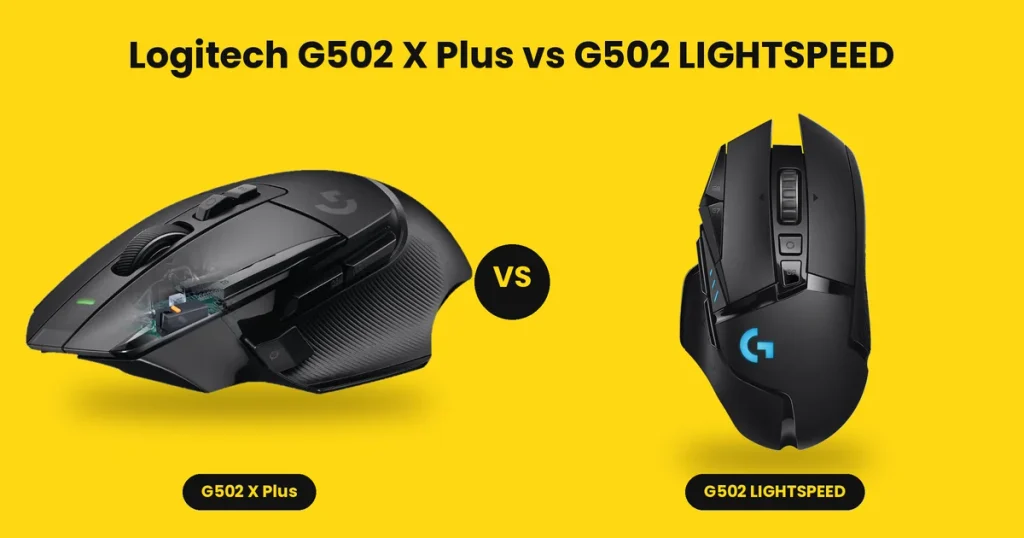
No Logitech G502 X Plus Review would be complete without comparing it to its predecessor. If you own the G502 LIGHTSPEED, the Logitech G502 X Plus vs Lightspeed question comes down to a few meaningful differences.
Optical-Mechanical Switches vs Traditional Mechanical
The G502 LIGHTSPEED uses traditional mechanical switches. They’re good, but they carry the long-term wear risk mentioned earlier. The X Plus’s LIGHTFORCE switches remove that weakness and add faster, crisper clicks.
Weight Reduction & Battery Efficiency
The X Plus is lighter than the older model, and its battery efficiency is better too. Together, that makes it noticeably nicer to live with day to day.
| Feature | G502 X Plus | G502 LIGHTSPEED |
| Switches | Optical-mechanical | Mechanical |
| Weight | Lighter (about 106g) | Heavier |
| Programmable controls | 13 | Fewer |
| Wireless | LIGHTSPEED | LIGHTSPEED |
| Bluetooth | No | No |
Should you upgrade?
If your LIGHTSPEED works fine, you can wait. If your switches are wearing out, or you want a lighter mouse with more controls, the X Plus is a meaningful step up.
Is the G502 X Plus Good for Daily Productivity & Work?
A good Logitech G502 X Plus Review should also cover work use, and the answer is yes. It’s a gaming mouse, but it works well as a work mouse for the right person.
Hyper-Fast Dual-Mode Scroll Wheel
The scroll wheel switches between ratcheted (notched) and free-spin modes. Ratcheted is great for precise navigation. Free-spin lets you fly through long documents, spreadsheets, or timelines in seconds.
13 Programmable Controls for Video Editing & Coding
With 13 programmable controls, you can map the shortcuts you use constantly:
- Video editors: Cut, ripple delete, zoom timeline, and undo on your thumb.
- Developers: Copy, paste, switch tabs, and run commands.
- Everyday work: Back, forward, and custom app shortcuts.
It’s bulky for a travel mouse, but on a desk it can replace a stack of keyboard shortcuts.
FAQ
How much does the Logitech G502 X Plus weigh?
About 106 grams.
Does the Logitech G502 X Plus have Bluetooth connectivity?
No. It uses LIGHTSPEED 2.4GHz wireless through the included USB receiver, plus a wired USB-C option.
What is the battery life on the Logitech G502 X Plus?
It depends heavily on lighting. Logitech rates it well over 100 hours with RGB off, and much less with default lighting on.
What is the difference between the G502 X Plus and G502 LIGHTSPEED?
The X Plus has LIGHTFORCE optical-mechanical switches, a lighter body, better battery efficiency, and more programmable controls. Both use LIGHTSPEED, and neither has Bluetooth.
Is the Logitech G502 X Plus good for productivity and work?
Yes, especially if you use shortcuts and scroll a lot. The dual-mode wheel and 13 programmable controls help in editing, coding, and spreadsheets.
Does it work with Mac computers?
Yes, it works with macOS, and Logitech G HUB supports Mac for customization. Check the current G HUB requirements for your macOS version.
Can I remap all the side buttons?
You can remap most programmable controls in G HUB. A few core functions, like the primary left click, are typically kept available by default so you don’t lock yourself out.
Does this mouse work wired while charging?
Yes. Connect the USB-C cable to charge and keep using it at the same time.
Does it support POWERPLAY wireless charging?
Yes, it’s compatible with Logitech POWERPLAY (sold separately).
Is this Logitech G502 X Plus Review based on real specs?
Yes. This Logitech G502 X Plus Review is built around Logitech’s published specifications and how those features affect everyday gaming and work use. Always confirm the latest details on the Amazon listing.
Final Verdict: Should You Buy the G502 X Plus on Amazon?
After this Logitech G502 X Plus Review, my answer is simple: it’s the best version of the G502 formula so far.
The LIGHTFORCE switches fix the old model’s biggest weakness, the lower weight makes long sessions easier, and LIGHTSPEED wireless is rock solid.
Buy it if:
- You love the G502 shape and want it wireless
- You want durable, fast switches
- You’ll use the extra buttons for gaming or work
Skip it if:
- You want an ultralight mouse
- You need Bluetooth
- You’re on a tight budget
For most people who want a premium, do-it-all wireless gaming mouse, it’s an easy recommendation.
If you’re ready to buy, the Logitech G502 X Plus Amazon listing is the easiest place to check the current price, stock, and bundle options.
Compare the standalone mouse against the bundle and pick whichever gives you better value.
Found this Logitech G502 X Plus Review helpful? Check the latest price below.
Related reads: