WP 301 Redirects Lifetime Deal Review: Best WordPress Redirect Plugin in 2026
Disclaimer: This article contains affiliate links. If you purchase through these links, we may earn a small commission at no extra cost to you. We only recommend tools we have independently researched and tested. Read our full Affiliate Disclosure.
Broken links and 404 errors can silently damage your website’s SEO, user experience, and affiliate income. If visitors land on missing pages, they often leave immediately — and Google notices that behavior.
You put in a lot of dedication, and as a result, if a searcher comes to your site and sees zero results, it will ruin your hard work and the foundation of trust you have built.
That’s why using a reliable WordPress redirect plugin is important.
In this detailed WP 301 Redirects Review, you’ll learn what the plugin does, how it works, its SEO benefits, and whether the WP 301 Redirects Lifetime Deal is worth buying in 2026.
Whether you run a blog, niche website, business site, or affiliate marketing project, this guide will help you decide if WP 301 Redirects is the right SEO redirect plugin for your needs.
Complete visibility | At a glance
Stop passing potential visitors and SEO rankings to dead ends. Automatic monitoring and smart redirects safeguard your site against broken links, malicious URLs, and those frustrating 404 errors.
A powerful alternative to Redirection and Broken Link Checker for WordPress
Key Highlights
- Find broken or dangerous outgoing links
- Use automatic redirection for wrong or improperly written URLs
- Manage multiple websites from one unified dashboard
- Quickly track clicks and real-time link performance
Integrations
- Google Safe Browsing
- WordPress
Ideal For
- Developers
- Digital marketers
- Web design and SEO agencies
What is WP 301 Redirects?
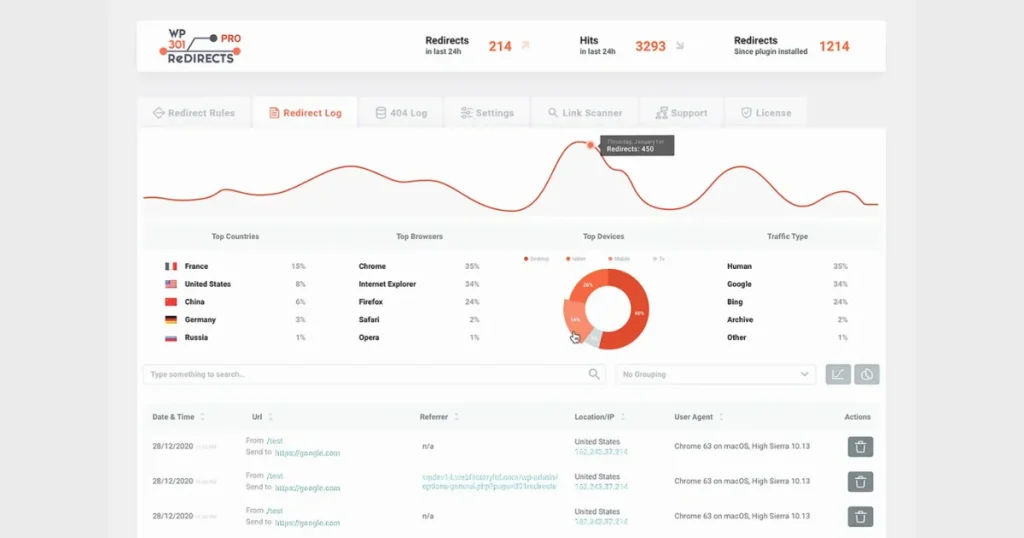
WP 301 Redirects is a WordPress 301 redirect plugin designed to help website owners manage redirects, monitor 404 errors, and fix broken links in WordPress.
The plugin allows you to redirect old or broken URLs to working pages automatically or manually. This helps preserve SEO rankings and improves the visitor experience.
Instead of displaying a “Page Not Found” error, the plugin redirects users to a relevant page instantly.
Who Should Use WP 301 Redirects?
WP 301 Redirects is designed for WordPress users who want to enhance their website’s SEO, resolve broken links, and improve the overall user experience. Whether you run a small blog or manage multiple client websites, the plugin can help maintain healthy redirects and prevent traffic loss.
Because modern SEO now focuses heavily on user intent and content relevance, redirect management has become more important than ever. Search engines and AI-powered systems favor websites that offer smooth navigation, up-to-date URLs, and error-free browsing experiences.
That’s where WP 301 Redirects becomes useful.
Affiliate Marketers
Affiliate marketers are one of the biggest beneficiaries of WP 301 Redirects.
Affiliate websites frequently:
- Update product pages
- Replace expired offers
- Change affiliate links
- Publish new landing pages
- Remove outdated content
Without proper redirects, these changes can create broken pages and lost commissions.
WP 301 Redirects helps affiliate marketers:
- Redirect expired AppSumo deals
- Preserve affiliate traffic
- Maintain SEO rankings
- Protect valuable backlinks
- Improve visitor retention
For affiliate websites focused on lifetime deals, software reviews, or product comparisons, redirect management is essential.
SEO Bloggers
SEO bloggers often publish:
- Tutorials
- Tool reviews
- Evergreen guides
- Updated SEO strategies
Over time, URLs may change due to:
- Content updates
- Site restructuring
- Keyword optimization
- Deleted articles
WP 301 Redirects help SEO bloggers:
- Prevent 404 errors
- Preserve search rankings
- Maintain internal linking structure
- Improve crawl efficiency
- Protect organic traffic
This is especially important for websites targeting long-tail keywords and informational search intent.
Agencies
Digital agencies usually manage multiple client websites simultaneously.
Manually handling redirects across many websites can become difficult and time-consuming.
WP 301 Redirects simplifies this process by helping agencies:
- Manage redirects efficiently
- Monitor broken links
- Improve technical SEO
- Handle site migrations
- Maintain client SEO performance
Agencies working with WordPress websites can use the plugin to reduce maintenance time while improving overall website health.
Niche Site Owners
Niche website owners rely heavily on organic traffic from Google and AI-driven search systems.
Even small SEO issues like broken pages can negatively affect:
- Search visibility
- User trust
- Affiliate conversions
- Page authority
WP 301 Redirects help niche site owners:
- Redirect outdated content
- Fix broken URLs
- Improve user experience
- Maintain keyword rankings
- Protect long-term traffic
For content-focused niche sites, proper redirect management supports both SEO and GEO optimization strategies.
WooCommerce Stores
WooCommerce store owners often:
- Remove discontinued products
- Update product URLs
- Change categories
- Launch seasonal offers
If these pages are deleted without redirects, customers may encounter 404 pages instead of relevant products.
WP 301 Redirects helps WooCommerce stores:
- Redirect unavailable products
- Preserve product SEO rankings
- Improve shopping experience
- Reduce cart abandonment
- Maintain internal link health
This can improve both search visibility and conversion rates.
What Makes WP 301 Redirects Different?
Many redirect plugins only offer simple URL redirection. WP 301 Redirects goes further by including:
- Automatic redirect rules
- 404 error monitoring
- Broken link tracking
- SEO optimization tools
- Link scanning features
- Traffic monitoring
- Smart redirect suggestions
Its dashboard is beginner-friendly, making it easier for non-technical users to manage redirects without coding knowledge.
Why are 301 Redirects Important for a website?
A 301 redirect informs search engines that a page has been permanently relocated to a new location.
This helps:
- Preserve SEO authority
- Maintain search rankings
- Transfer link equity
- Prevent traffic loss
- Improve crawl efficiency
Without proper redirects, deleted or changed URLs can lead to broken pages that negatively affect SEO performance and rankings.
Why Broken Links Harm Your Website
Broken links create a poor user experience and reduce website trust.
Some major SEO problems caused by broken links include:
- Higher bounce rate
- Lower search rankings
- Lost backlink value
- Poor crawl efficiency
- Reduced conversions
If you run an affiliate website, broken links can directly reduce your commissions because users may never reach your offer pages.
Why Affiliate Marketers Need Redirect Plugins
Affiliate websites frequently update content, offers, and landing pages.
A redirect plugin helps affiliate marketers:
- Redirect expired deal pages
- Maintain SEO rankings
- Protect valuable backlinks
- Reduce 404 errors
- Improve conversion rates
For websites publishing AppSumo lifetime deals regularly, redirect management becomes extremely important.
Benefits of Using WP 301 Redirects
Here are some of the biggest advantages of using WP 301 Redirects:
Easy Redirect Setup
You can create redirects in seconds without technical knowledge.
Automatic 404 Monitoring
The plugin tracks missing pages and helps fix errors quickly.
Improved SEO Performance
Redirects preserve rankings and improve site health.
Better User Experience
Visitors reach working pages instead of error pages.
Time-Saving Automation
Automatic redirects reduce manual work.
WP 301 Redirects AppSumo Lifetime Deal facilities
The AppSumo Lifetime Deal provides excellent long-term value.
Rather than paying recurring monthly fees, you receive:
- Lifetime access for the user
- One-time payment, no more
- Future updates facility
- Cost savings for a lifetime
- Multiple website usage options for a little investment
For bloggers and affiliate marketers, lifetime deals often provide better ROI than yearly subscriptions.
Pricing of WP 301 Redirects Lifetime Deal
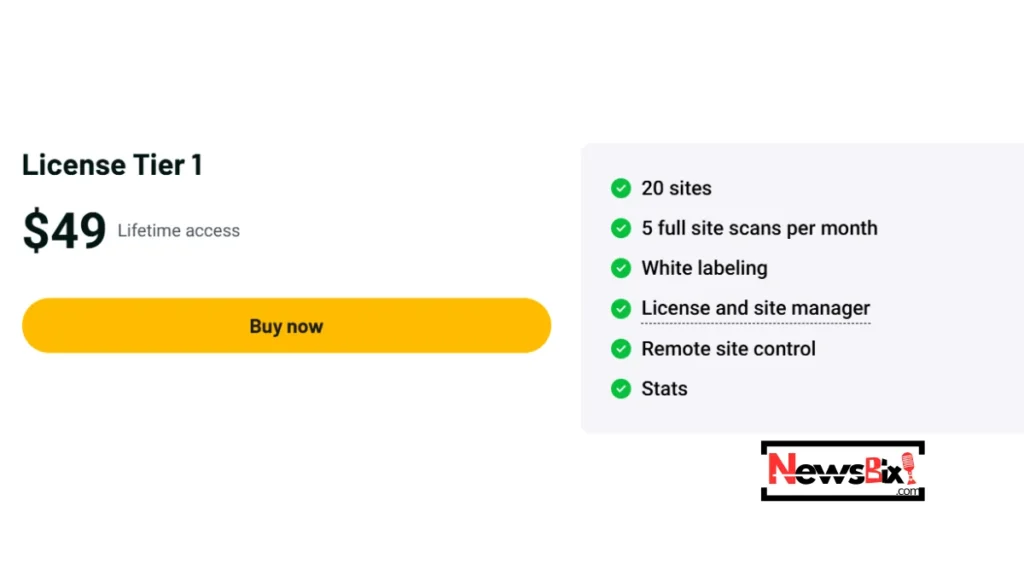
License Tier 1
Price: $49 (one-time payment)
Regular Price: $158
Discount: 69% Off
Access: Lifetime License
Refund Policy: 60-Day Money-Back Guarantee
How to Install WP 301 Redirects in WordPress
Follow these simple steps:
Step 1: Purchase or Download the Plugin
Access the WP 301 Redirects plugin through its official website or AppSumo deal page.
Step 2: Upload the Plugin
Go to:
WordPress Dashboard → Plugins → Add New → Upload Plugin
Step 3: Activate the Plugin
Click “Activate” after installation.
Step 4: Open Plugin Dashboard
Access the WP 301 Redirects settings from your WordPress admin menu.
How to Create a 301 Redirect
Creating redirects is simple.
Step-by-Step Guidelines
- Open the Redirects section
- Enter the old URL
- Add the new destination URL
- Choose redirect type (301)
- Save changes
- Test the redirect
Your old URL will now automatically redirect users to the new page.
How to Resolve 404 Errors in WordPress with WP 301 Redirects
One of the strongest features of this plugin is 404 error tracking.
Here’s how it works:
- Detects missing URLs
- Logs 404 page visits
- Suggests redirect opportunities
- Helps repair broken pages quickly
This feature helps improve SEO and reduces visitor frustration.
How to Monitor Broken Links
The plugin dashboard allows you to monitor:
- Broken pages
- Redirect statistics
- URL activity
- Error frequency
- Traffic behavior
This helps website owners identify SEO issues before rankings drop.
Complete Guide to WP 301 Redirects Features
Main features include:
301 Redirect Management
Create permanent redirects easily.
404 Error Scanner
Track missing pages automatically.
Automatic Redirects
Generate redirects without manual setup.
Link Monitoring
Monitor internal and external links.
Traffic Tracking
View redirect usage statistics.
Beginner’s Guide to SEO Redirect Plugins
Redirect plugins help manage URL changes properly.
Common Redirect Types
301 Redirect
Permanent redirect for SEO purposes.
302 Redirect
Temporary redirect.
307 Redirect
Temporary redirect with stricter behavior.
For SEO, 301 redirects are usually the best choice.
Beginner’s Guide to Choosing a WordPress Redirect Plugin
When selecting a redirect plugin, look for:
- Easy setup
- SEO optimization
- Fast performance
- Automatic redirect support
- 404 monitoring
- Reliable updates
- User-friendly dashboard
WP 301 Redirects performs well in all these areas.
Tips for Managing Redirects Effectively
Avoid Redirect Chains
Too many redirects slow websites and hurt SEO.
Monitor 404 Errors Regularly
Check error logs weekly.
Update Old URLs Carefully
Redirect outdated URLs after redesigns.
Organize Redirect Rules
Keep redirects structured and clean.
Tips for Affiliate Marketers Using Redirect Plugins
Affiliate marketers should:
- Redirect expired AppSumo offers
- Protect high-ranking pages
- Monitor affiliate landing pages
- Track broken outbound links
These practices improve both SEO and revenue.
SEO Tips for Redirect Optimization
Use Permanent Redirects Correctly
Use 301 redirects for moved pages.
Avoid Soft 404s
Redirect pages to relevant content only.
Maintain Internal Links
Update internal links after redirects.
Improve Crawl Budget
Remove unnecessary redirect loops.
Is WP 301 Redirects Safe to Use?
Yes, WP 301 Redirects is generally considered safe to use for most WordPress websites. It is designed to manage redirects, monitor broken links, and improve site maintenance without making risky core changes.
Plugin Reputation
WP 301 Redirects Official Website has been used by bloggers, affiliate marketers, agencies, and WooCommerce store owners. The plugin focuses on redirect management and SEO maintenance, which makes it popular among WordPress users managing multiple pages or expired URLs.
Update Frequency
A safe WordPress plugin should receive regular updates to stay compatible with new WordPress versions and security standards. WP 301 Redirects receives ongoing maintenance and feature improvements, which help reduce compatibility issues and plugin conflicts.
Performance Impact
The plugin is lightweight compared to many all-in-one SEO tools. Properly configured redirects usually have minimal impact on website speed. However, creating too many redirect chains or unnecessary rules can slightly affect performance on large websites.
Security Concerns
No major public security concerns are commonly associated with WP 301 Redirects. Still, like any WordPress plugin, keeping it updated is important. Outdated plugins can become vulnerable over time if you ignore them.
Backup Recommendations
Before enabling bulk redirects or automatic cleanup features, create a full website backup. This protects your site if:
- Redirect rules are configured incorrectly
- Important URLs are removed accidentally
- Plugin conflicts occur after updates
Using a backup plugin or your hosting provider’s backup system is strongly recommended.
WP 301 Redirects Comparison
WP 301 Redirects vs Redirection Plugin
Choosing the right redirect plugin depends on your website size, automation needs, and SEO workflow. Both plugins help manage redirects, but they target different types of users.
| Redirect Management | Advanced | Basic |
| Broken Link Monitoring | Yes | Limited |
| Automatic Redirect Suggestions | Yes | No |
| SEO Cleanup Tools | Included | Minimal |
| User Interface | Beginner-friendly | More technical |
| Performance Monitoring | Available | No |
| Automation Features | Strong | Basic |
| Pricing | Premium-focused | Mostly free |
| Best For | Affiliate sites, agencies, SEO users | Simple redirect management |
Ease of Use
WP 301 Redirects is easier for beginners because it combines redirects, monitoring, and SEO maintenance in one dashboard. Redirection Plugin is powerful but more manual and technical for non-SEO users.
Automation
WP 301 Redirects focuses heavily on automation. It can help detect issues, monitor broken links, and simplify redirect management. Redirection Plugin mainly requires manual setup and maintenance.
Pricing
Redirection Plugin is popular because it is free. WP 301 Redirects is a premium solution with more advanced SEO and automation features for growing websites.
Best Use Case
- WP 301 Redirects: Best for affiliate marketers, niche site owners, agencies, and WooCommerce stores.
- Redirection Plugin: Best for small blogs needing simple manual redirects.
SEO Advantage
WP 301 Redirects offers more SEO-focused tools, including broken link monitoring and automated cleanup features. This helps preserve link equity and improve crawl efficiency during site updates.
WP 301 Redirects vs Rank Math Redirects
Many WordPress users compare these tools because both include redirect functionality. However, their core purposes are very different.
| Feature | WP 301 Redirects | Rank Math Redirects |
|---|---|---|
| Main Focus | Redirect & site cleanup | Full SEO suite |
| Redirect Automation | Advanced | Moderate |
| Broken Link Detection | Yes | Limited |
| SEO Features | Redirect-focused | Complete SEO toolkit |
| Interface | Simple & focused | Feature-heavy |
| Resource Usage | Lightweight | Heavier |
| Pricing | Dedicated premium tool | Included in the SEO plugin |
| Best For | Redirect management | All-in-one SEO management |
Ease of Use
WP 301 Redirects keeps the interface focused only on redirects and site health. Rank Math includes many SEO modules, which may feel overwhelming for beginners.
Automation
WP 301 Redirects provides more redirect-specific automation and monitoring features. Rank Math handles redirects well but treats them as part of a larger SEO system.
Pricing
If you already use Rank Math Pro, its redirect module may be enough for basic needs. WP 301 Redirects becomes more valuable when you need dedicated redirect management and cleanup automation.
Best Use Case
- WP 301 Redirects: Best for websites managing expired pages, affiliate links, migrations, or broken URLs regularly.
- Rank Math Redirects: Best for users wanting redirects inside a complete SEO plugin ecosystem.
SEO Advantage
WP 301 Redirects specializes in preserving SEO value during URL changes and site restructuring. Its focused redirect management can reduce crawl errors and improve user experience more efficiently for large content sites.
WP 301 Redirects Lifetime User Reviews & Ratings
What Users Are Saying About WP 301 Redirects
AppSumo Ratings
WP 301 Redirects currently holds an impressive 4.8 rating on AppSumo with more than 281 verified reviews. Most buyers praise its redirect automation, broken link monitoring, and beginner-friendly dashboard.
Positive User Feedback
Many users describe the plugin as:
- Easy to configure
- Helpful during website migrations
- Effective for fixing 404 errors
- Lightweight compared to large SEO plugins
Reddit Discussions & SEO Community Opinions
On Reddit, SEO professionals frequently discuss the importance of proper 301 redirects during migrations and URL changes. Many users agree that well-managed redirects help preserve rankings and reduce traffic loss.
Some community discussions also mention:
- Redirect chains can slow websites if unmanaged
- Internal 301 redirects should be cleaned regularly
- Proper redirect structure improves crawl efficiency
Common Complaints
Although most feedback is positive, some users reported:
- Occasional unexpected redirects
- Learning curve for advanced features
- Increased server requests on certain setups
- Minor speed issues on large websites
A few negative AppSumo reviews also mentioned concerns about aggressive redirect behavior if settings are configured incorrectly.
Overall Consensus
The consensus across AppSumo reviews, WordPress users, and SEO discussions is that WP 301 Redirects is a powerful redirect management plugin best suited for:
- Affiliate marketers
- SEO-focused websites
- Agencies
- Large WordPress sites with frequent URL changes
Most users see it as a reliable SEO maintenance tool when configured correctly and monitored regularly.
Who Should NOT Use WP 301 Redirects
WP 301 Redirects isn’t the right fit for everyone. Before you buy, it’s worth being upfront about who should probably skip this one:
Small, single-site blog owners
If you run just one small website and rarely need more than a couple of redirects a month, this premium tool is overkill. A free plugin like Redirection will likely cover your needs just fine.
Anyone managing more than 20 sites
AppSumo’s License Tier 1 caps you at 20 sites. If you’re managing more websites than that, this lifetime deal won’t be enough on its own — you’d need a higher tier or a different solution altogether.
Those looking for a complete all-in-one SEO suite
If you want redirect management bundled together with keyword tracking, content optimization, and backlink audits all in one place, a full SEO suite like Rank Math or Semrush is a better fit. WP 301 Redirects stays focused specifically on redirects and broken-link management.
Budget-conscious beginners still experimenting
If you’re just starting out and not yet sure you’ll stick with your current site or niche long-term, it makes more sense to start with a free alternative before committing $49.
FAQ for WP 301 Redirects Lifetime Deal
Is WP 301 Redirects a one-time payment or a subscription?
It’s a one-time payment through this AppSumo deal — $49 for lifetime access, with no recurring subscription fees.
How many websites can I connect with one license?
The License Tier 1 plan covers up to 20 sites under a single license.
Can I use wildcard rules for more flexible redirects?
Yes, WP 301 Redirects supports wildcard-based rules, which lets you set up broader redirect patterns instead of matching one URL at a time. For exact setup steps, check the plugin’s official documentation.
Can I back up or transfer my redirect rules between sites?
Yes, the plugin lets you export your existing rules and import them elsewhere, which is handy for migrations or keeping a backup of your settings.
Is there a free trial or refund option?
There’s no free trial, but the AppSumo lifetime deal includes a 60-day money-back guarantee, so you can try it risk-free.
How does it compare to the free Redirection plugin?
Redirection works fine for basic manual redirects. WP 301 Redirects is a better fit if you want automation, broken-link monitoring, and centralized multi-site management.
Will this plugin slow down my website?
Not under normal use — the plugin itself is light on resources. That said, stacking up too many redirect rules or letting chains build up over time can start to drag on page speed, especially on bigger sites.
In Conclusion: Is WP 301 Redirects Worth It?
WP 301 Redirects is more than just a redirect manager. It combines redirect management, broken link monitoring, 404 error tracking, affiliate link tools, and SEO maintenance all in one WordPress package.
If you are an affiliate marketer, blogger, agency owner, or an SEO professional managing a large number of sites, this plugin will protect your rankings and enhance user experience while minimizing technical SEO fixes. By removing long-term subscription costs, the AppSumo lifetime deal adds recurring value over time.
Free alternatives are ok with small website owners, but users who require complex automation, centralized management, and continuous SEO monitoring will most likely get the most value from this tool.
In summary, that concludes our WP 301 Redirects review, and we think this plugin is a good option if you are looking for a reputable WordPress 301 redirect plugin. The WP 301 Redirects lifetime deal will be one of the best WordPress redirect plugins to fix broken links, manage redirects, and support long-term SEO growth, which you should consider.